
 Infy Interview
 Infy Resume
 Infy Recruit


















learning activities completed
 Infy LMSLMS for colleges and universities
The live-led LMS for institutions
Degree terms, batches and L&D cohorts in one LMS. Teach in our Live Meetings app, on Zoom or Teams, or in class.
Dashboard
Sessions
Assessments
Courses
Calendar
Term 2, week 6
Welcome back
Two classes and one test are due this week.
Your Courses
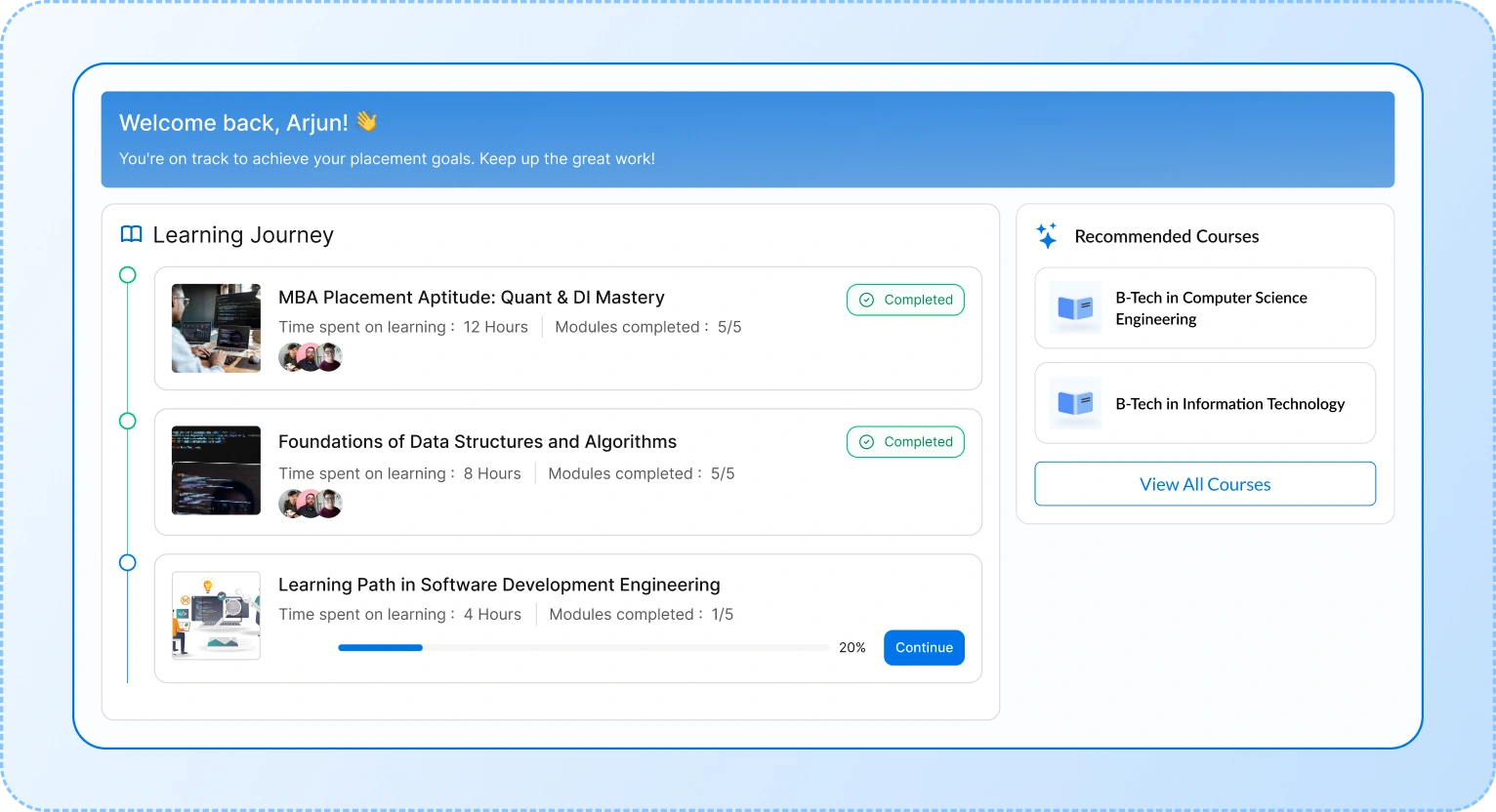
Learning Path in Software Development Engineering
Time spent: 4 HoursModules done: 1/5
20%
Continue
MBA Placement Aptitude: Quant & DI Mastery
Time spent: 12 HoursModules done: 5/5
Foundations of Data Structures and Algorithms
Time spent: 8 HoursModules done: 5/5
Recommended Courses
B-Tech in Computer Science Engineering
B-Tech in Information Technology
View All Courses
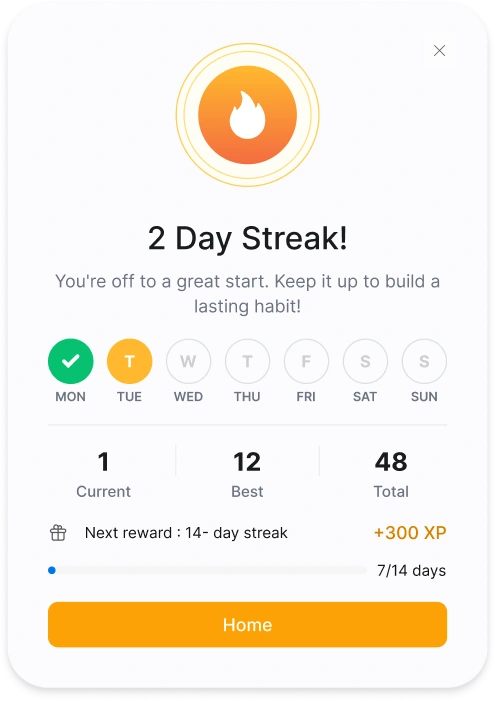
2-day streak
You're off to a great start. Keep it up to build a lasting habit!
MON
TTUE
WWED
TTHU
FFRI
SSAT
SSUN
2Current
12Best
48Total
Next reward: 14-day streak
+300 XP
Home
Scan the QR code below to mark your attendance for the session
The QR code will refresh in 00:15 sec
Next live class
LIVE
T
Problem Solving, Section A
Today. Join from the course
Live now
T
Problem Solving, Section A
Faculty · started 6 min ago
32 of 40 joined
Join class
Today's live sessions Today
Now
Problem Solving, Section ALive now · 32 of 40 joined
Join
Next
Data Structures labMicrosoft Teams
Later
Aptitude doubt clearingLive Meetings
Recorded class
12:40 left
Recursion and backtracking
Module 3 of 5 . Data Structures Resume
Data Structures
5 video modules . 8 hours
Arrays and strings 24 min
Linked lists 31 min
Recursion and backtracking 12:40 left
Trees and graphs 46 min
Continue watching
Recursion and backtracking
12:40 left
Institutions that work with InfyLearn
Running degree terms today.
published courses
Why classes, attendance and marks end up in different places.
Most institutions teach across separate tools, and four things fall between them.
The gap: Live classes and attendance outside the course
Every live class, inside the course.
Our Live Meetings app, Zoom or Teams, or a QR code in the classroom. Attendance comes back to the course.
Data Structures · Module 3In the course
- Live classLive Meetings app58 / 62 present
- RecordingBack in the moduleReady
- Room 204QR attendance, lecture 1258 / 62 present
- Zoom or Teams classYour institution’s accountAttendance back
The gap: Marks in spreadsheets, seen only at results
The gradebook adds itself up.
The assessments and sessions that count carry the weight you set, so you see who is slipping before the results.
Data Structures · GradebookWeights
- Mid-term test30%
- Assignments20%
- 1:1 sessions10%
- End-term test40%
Course total100%
The gap: Degrees squeezed into flat courses
Run degrees term by term.
Campuses, programmes, sections and specialisations, built in.
B.Tech CSE · 2026 intakeProgramme
Term 1Term 2Term 3
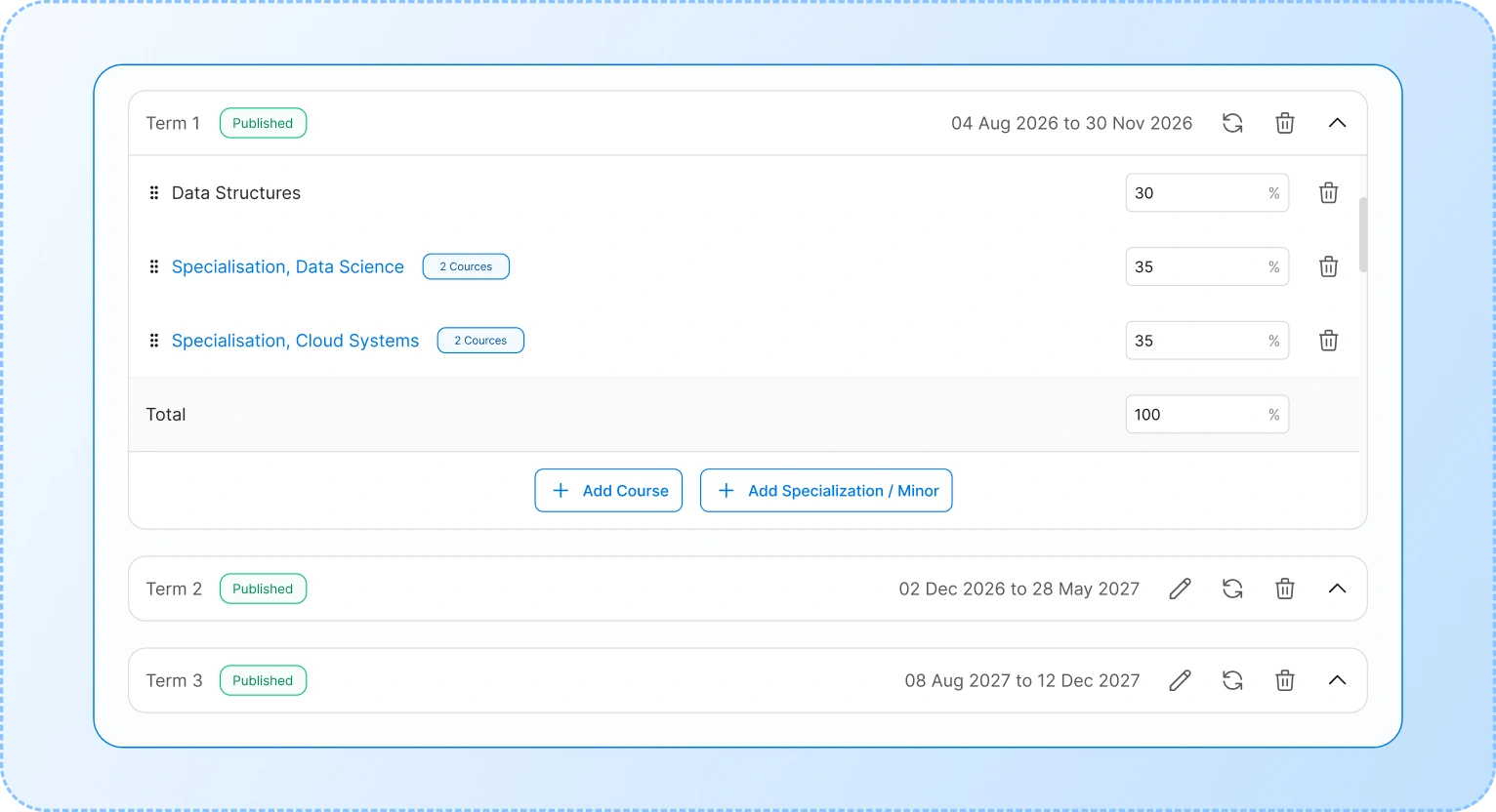
- Core courseAll sectionsProgramming in C
- TrackSections B and DData Science
- TrackSection CCloud Systems
The gap: Tests in a separate tool
Tests run from the course.
Proctored, AI-marked and coding tests, straight to the gradebook.
Data Structures · Module 4In the course
- Mid-term testSet in the moduleInfy Assess
- ProctoringYour staff decide on flagsOn
- ResultPosted to the gradebook25 / 30
- Weight in the course totalSet by faculty30%
Use cases
Who uses Infy LMS, and when.
Degrees, faculty courses, placement batches and corporate L&D cohorts, each set up the way it is taught.
Academic teamsSee a programme set up term by term Training teams
Degree programmes, term by term
Levels run from your whole institution down to a section or batch, and each admin sees only their part. Our team sets up your programmes with you.
InstitutionYour whole university
CampusEach campus on its own
ProgrammeB.Tech CSE, MBA
TermSemester, trimester or annual
CoursesCore and specialisations
Sections, batchesSection A
Placement and skills training
One course, many batches on their own dates, with practice tests for each batch.
See how FacultyCertificate and value-added courses
Modules that open in order, and a certificate in your design when a learner completes.
See how FacultyClassroom teaching
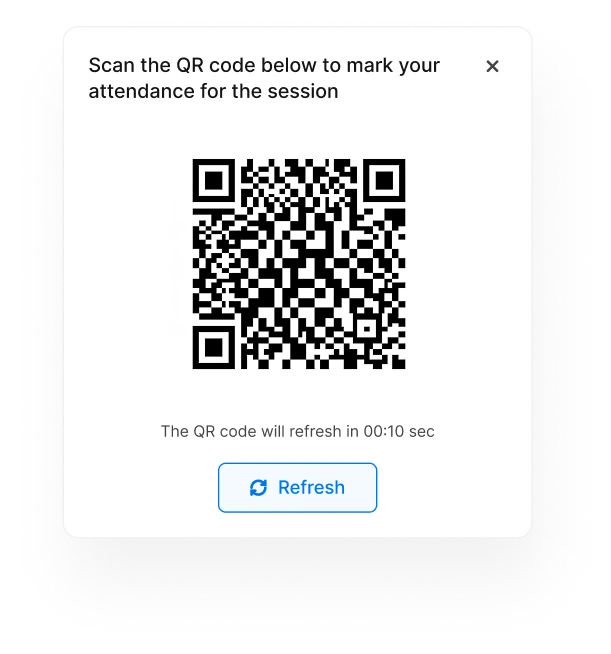
Project a QR code in the room. Learners scan it to mark themselves present.
See how Corporate L&DLive cohort programmes
Each cohort live, with self-paced work between sessions and a certificate on completion.
See howTraining teams Placement and skills training, batch by batch.
Batches on their own datesOne course; update content once for every batch.
Aptitude and Coding, Final year 20275 batches
| Batch | Learners | Starts |
|---|---|---|
| Batch A Default | 34 | 3 Aug 2026 |
| Batch B | 32 | 10 Aug 2026 |
| Batch C | 31 | 17 Aug 2026 |
| Batch D | 30 | 24 Aug 2026 |
| Batch E | 29 | 31 Aug 2026 |
Content updated once for every batchCreate batch
Sessions in bulk by CSVAssign by programme, section, batch or tags.
Create sessions in bulkCSV
placement-sessions.csv Checked
| Session | Type | Assign to |
|---|---|---|
| Quant drill 1 | Group | Batch A |
| Mock GD round 1 | Group discussion | Section B |
| Coding lab 1 | Group | Tag: Coding |
| Aptitude review | Group | Programme |
Create sessions
One session, several batchesOne meeting, one attendance record.
Logical reasoning, liveGroup session
BatchesBatch ABatch BBatch C
One meeting One attendance record
RepeatsDailyWeeklyMonthly
Group discussions in bulkBreakout groups created in one go.
Group discussions, Section ACreated in bulk
GD 1AKRSMJPD
GD 2NVSGTBKL
GD 3YRHPDMCS
GD 4VBINFAOM
Attendance by sectionEvery learner, every session; export to CSV.
Attendance by sectionSection A
| Roll no. | S1 | S2 | S3 | S4 | Total |
|---|---|---|---|---|---|
| 23BCS014 | P | P | A | P | 3 / 4 |
| 23BCS015 | P | P | P | P | 4 / 4 |
| 23BCS021 | P | A | P | P | 3 / 4 |
| 23BCS027 | P | P | P | A | 3 / 4 |
| 23BCS032 | P | P | P | P | 4 / 4 |
Export CSV
Corporate L&D Live cohort programmes, from the first session to the certificate.
Live cohort sessionsOn Live Meetings, or your own Zoom or Teams.
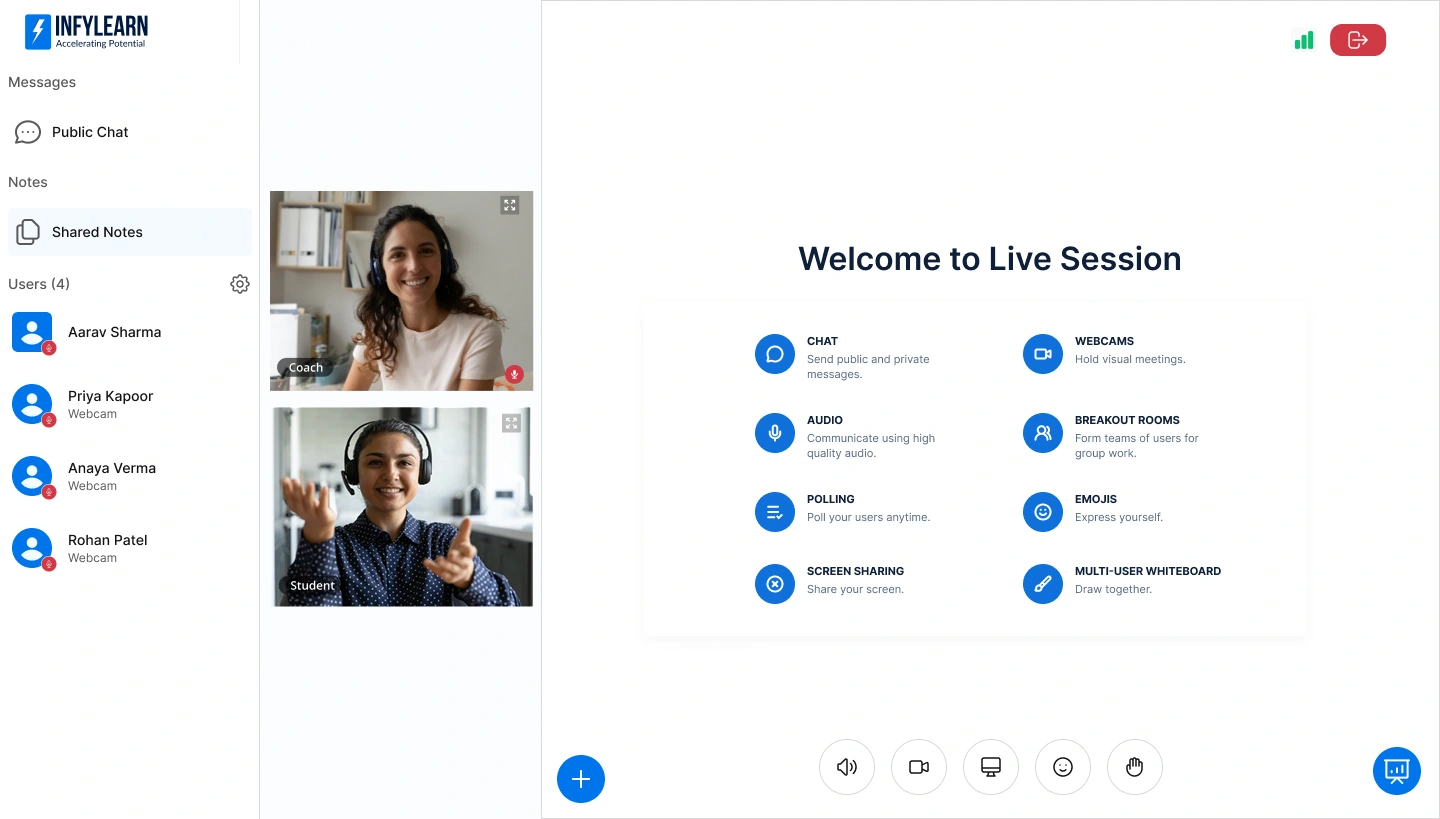
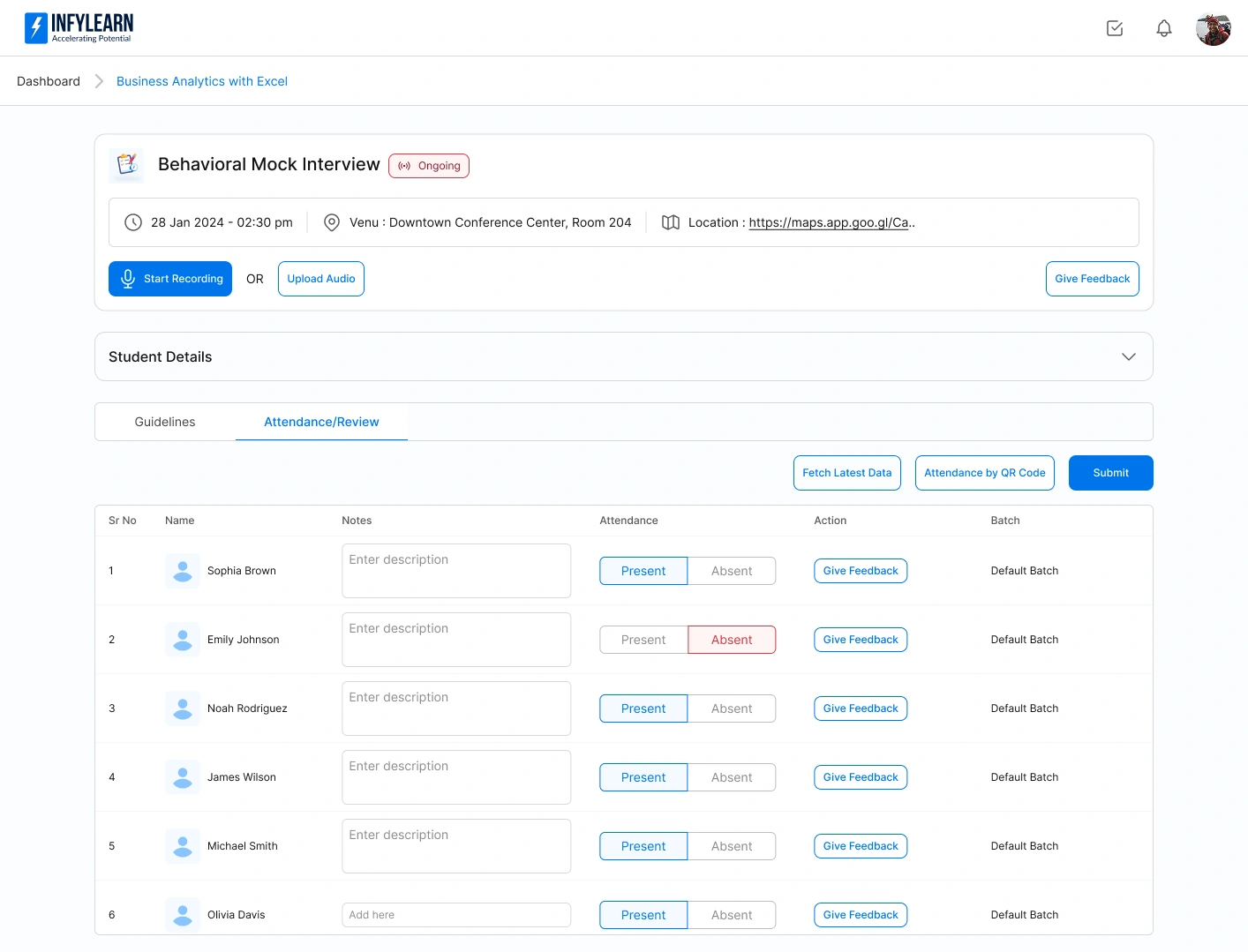
Coaching sessionsCoaches mark attendance, add notes and give each learner feedback.
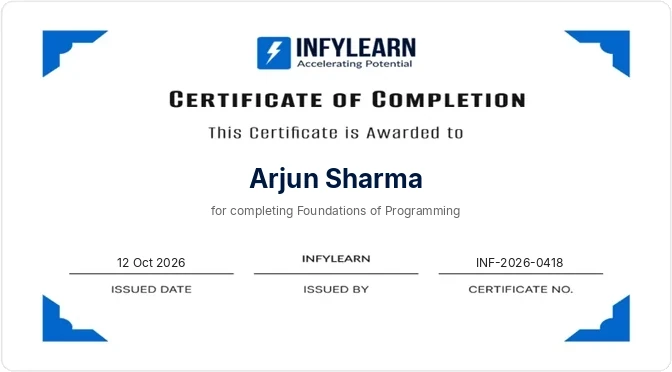
CertificatesA certificate on completion, in your design.
How Infy LMS works, in eight steps.
Faculty build each course once. Our team can build the first ones with you.
Set the term system
Choose semesters, trimesters or annual terms for each programme. Our team sets it up with you.
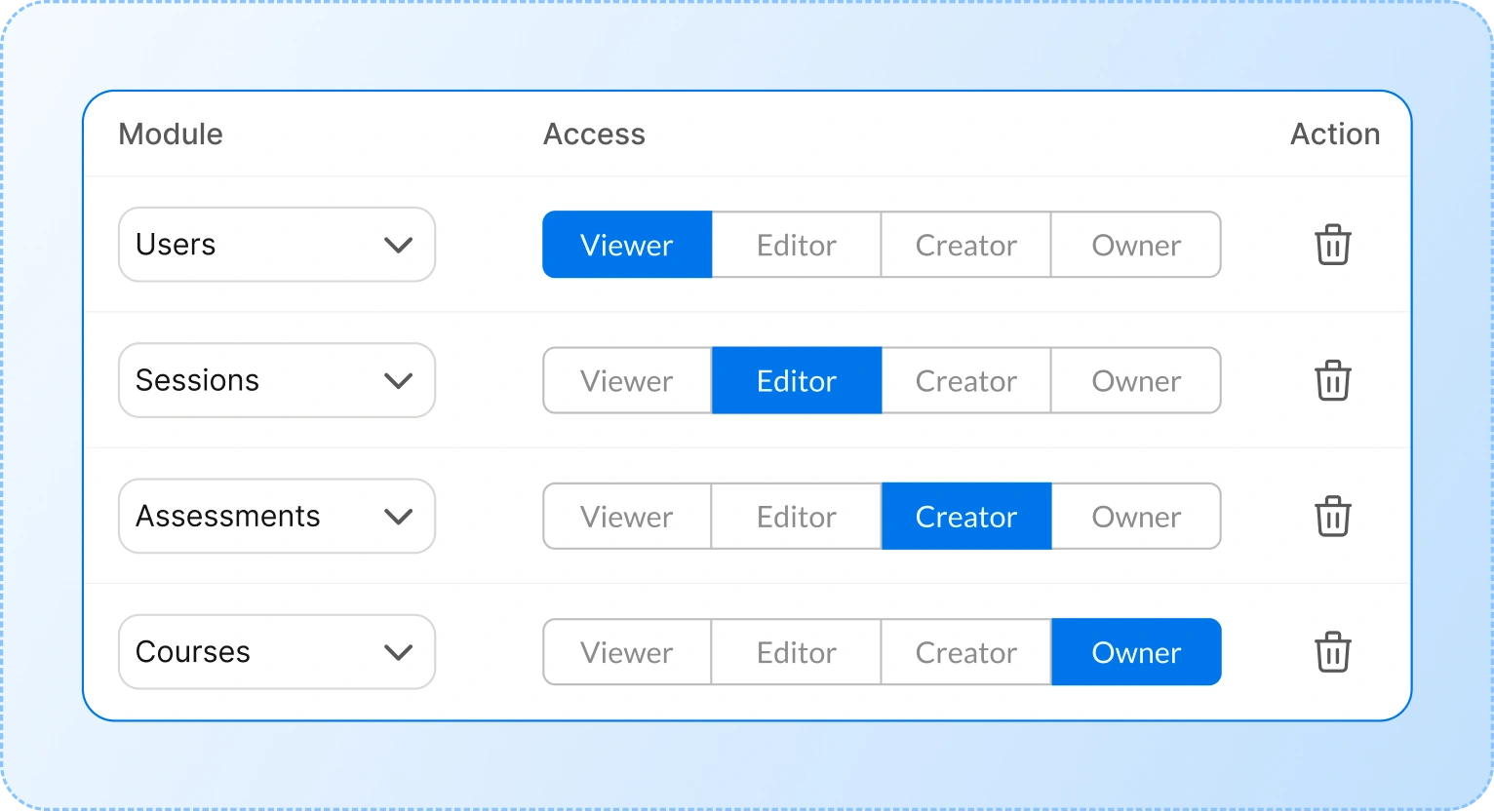
Give each person their part
Each admin gets viewer, editor, creator or owner access, area by area.
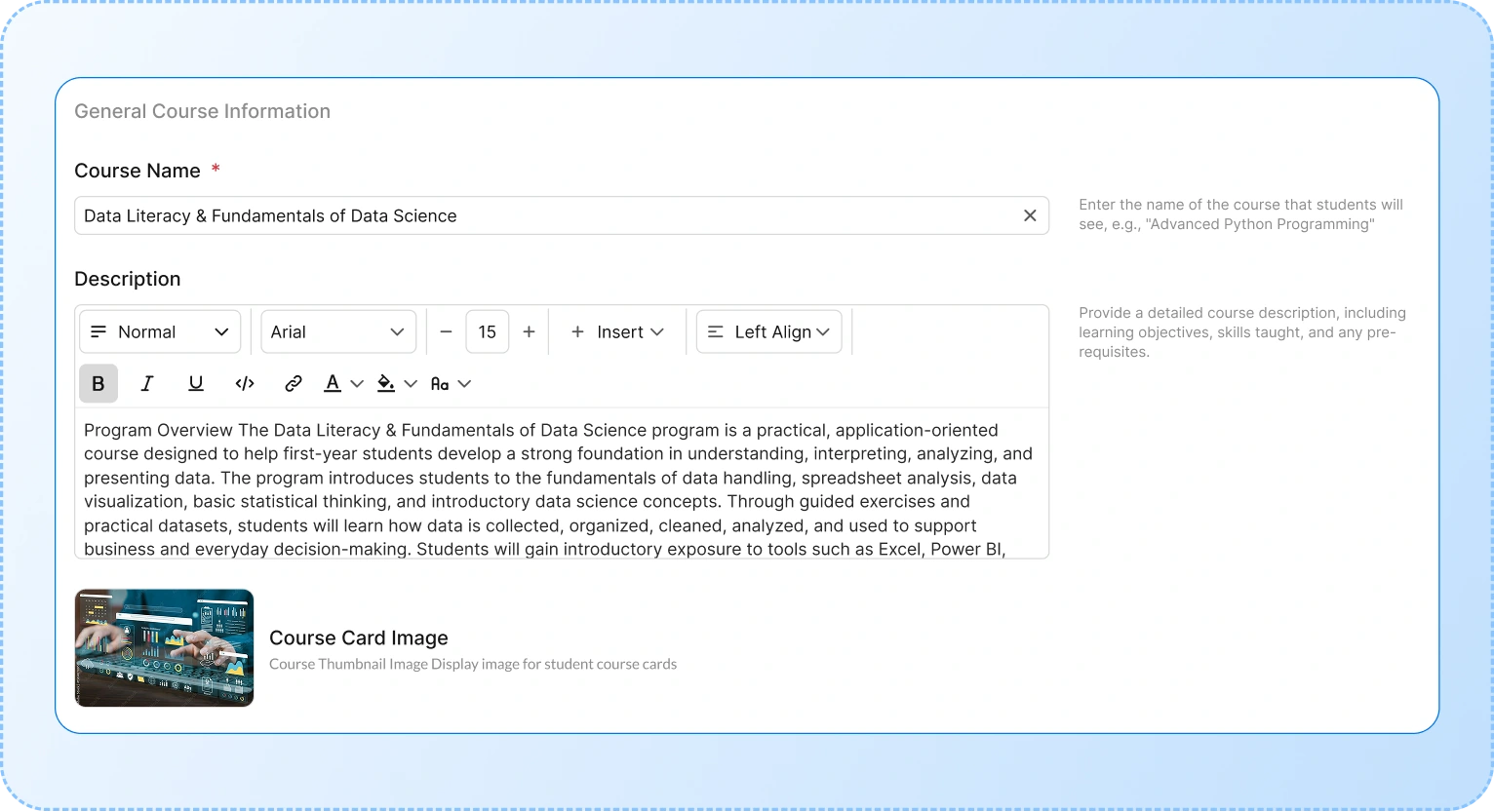
Add course details
Faculty add the course name, description and course card.
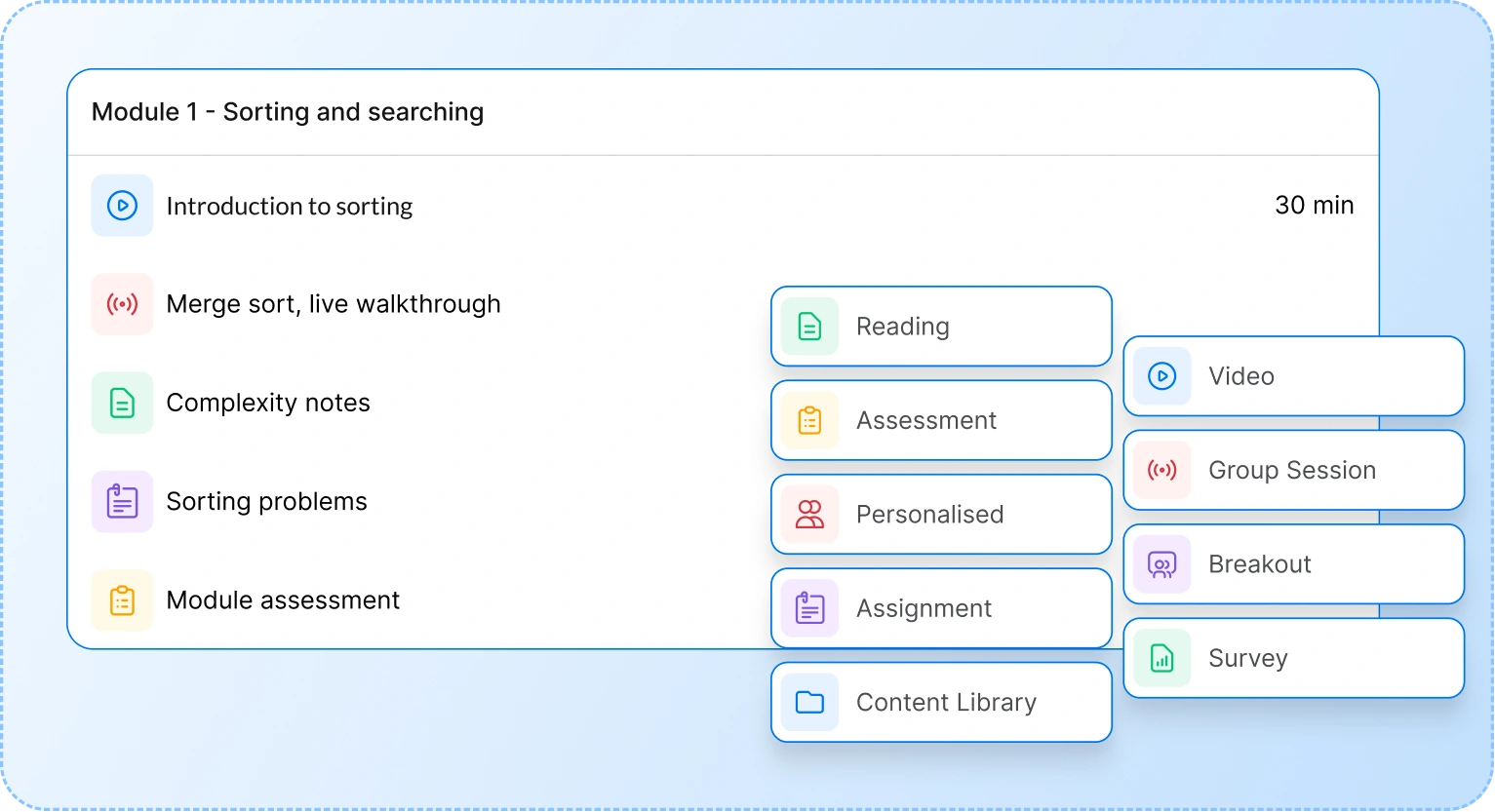
Build the modules
Add videos, live sessions, assignments, assessments and surveys to each module.
Set the rules
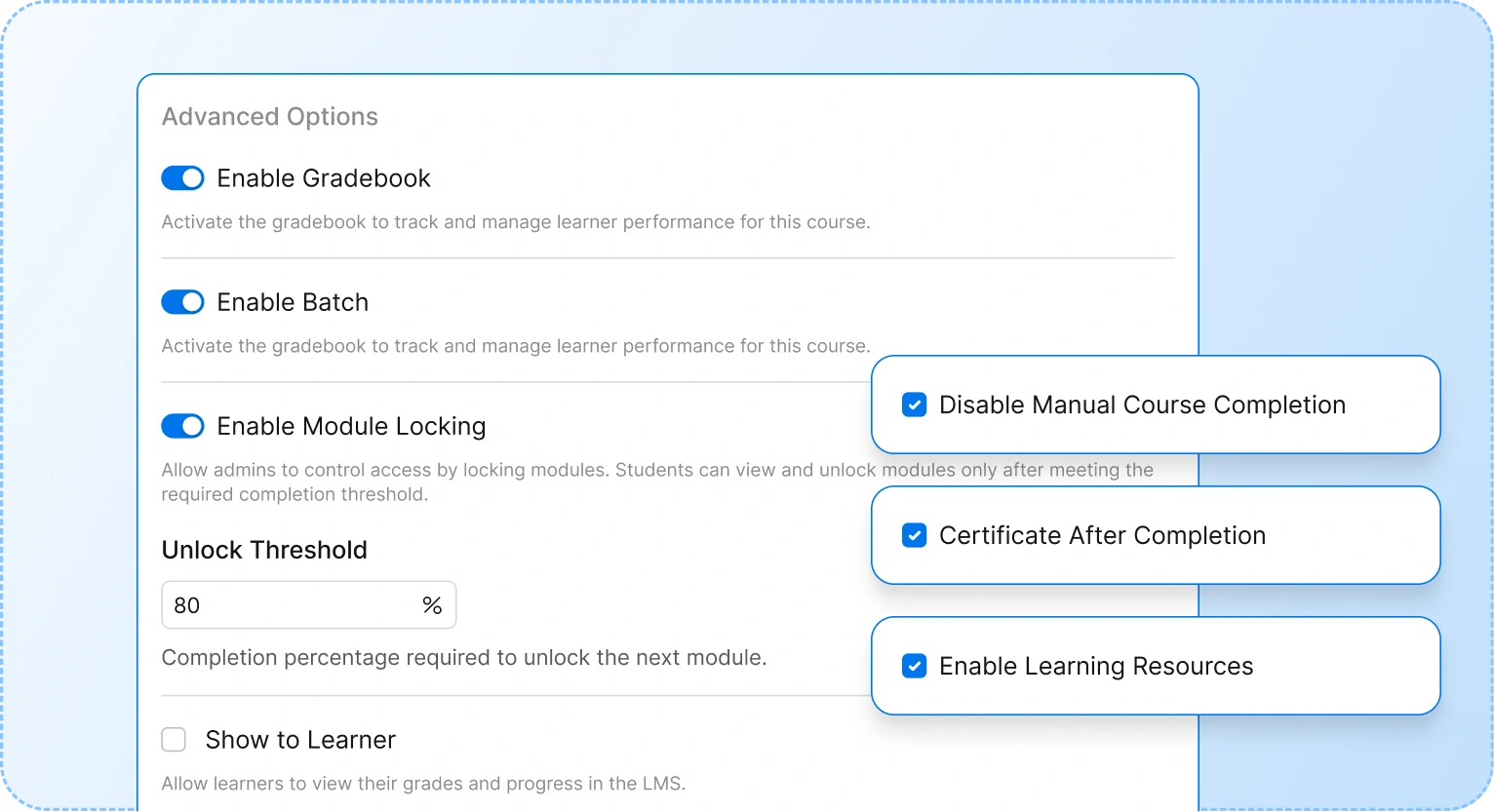
Choose the order modules open in, and learners get a certificate on completion.
Weight the gradebook
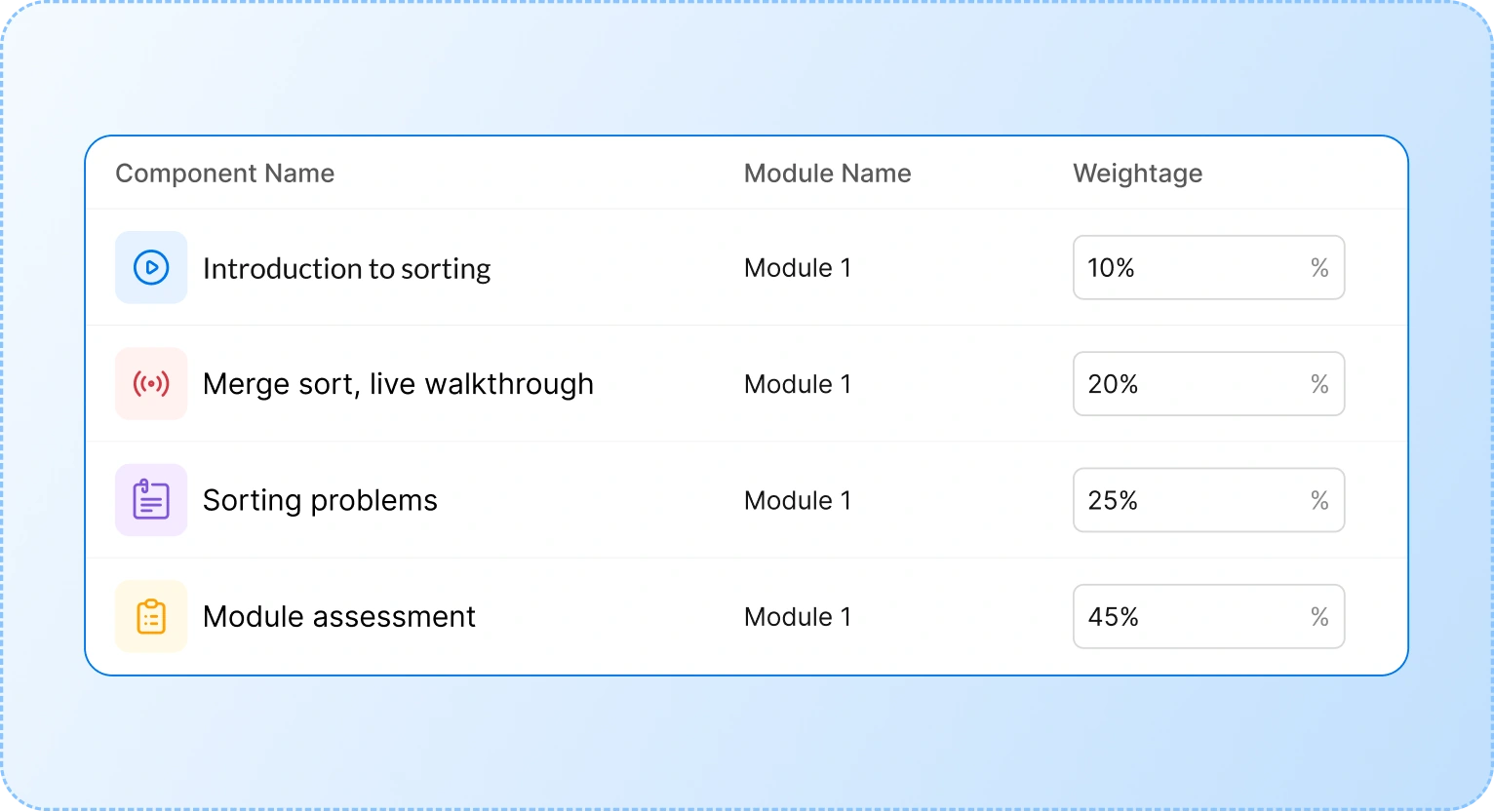
Give each assessment and session that counts a share of the course total.
Add learners and publish
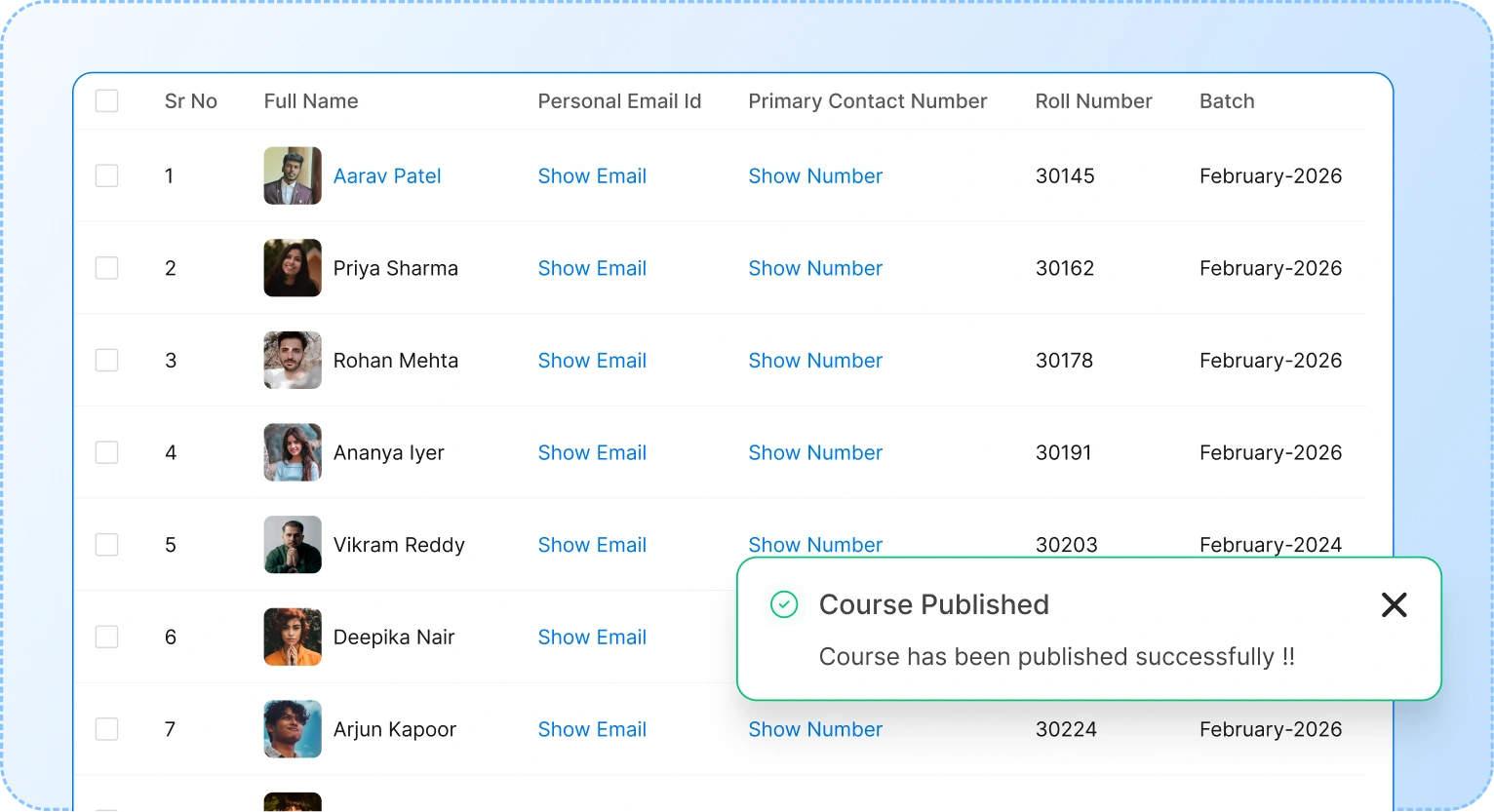
Add a whole intake or batch at once, then publish the course.
Learners open the term
Learners see their courses, progress and what is due next on one dashboard.
Programmes, courses and the gradebook, in one LMS.
What faculty and admins at colleges and universities use every term.
Degree programmes, set up for you term by term
- Term managementDegree programmes, term by term
- Institution hierarchyCampus, programme, section
- Sections and specialisationsCore courses and specialisation tracks in each term
- BatchesOne course, many batches, own dates
- Course calendarUpcoming classes and tests
- Set up by our teamYour campuses, programmes, terms and sections
- Academies tooTracks, cohorts and batches on the same structure
Courses built once, with modules that open in order
- Course builderVideo, rich text, assessment, project, survey
- Module lockingModules open in order
- AssignmentsAdded as a component in any module
- CertificatesIn your design
- AnnouncementsOn every learner's home page
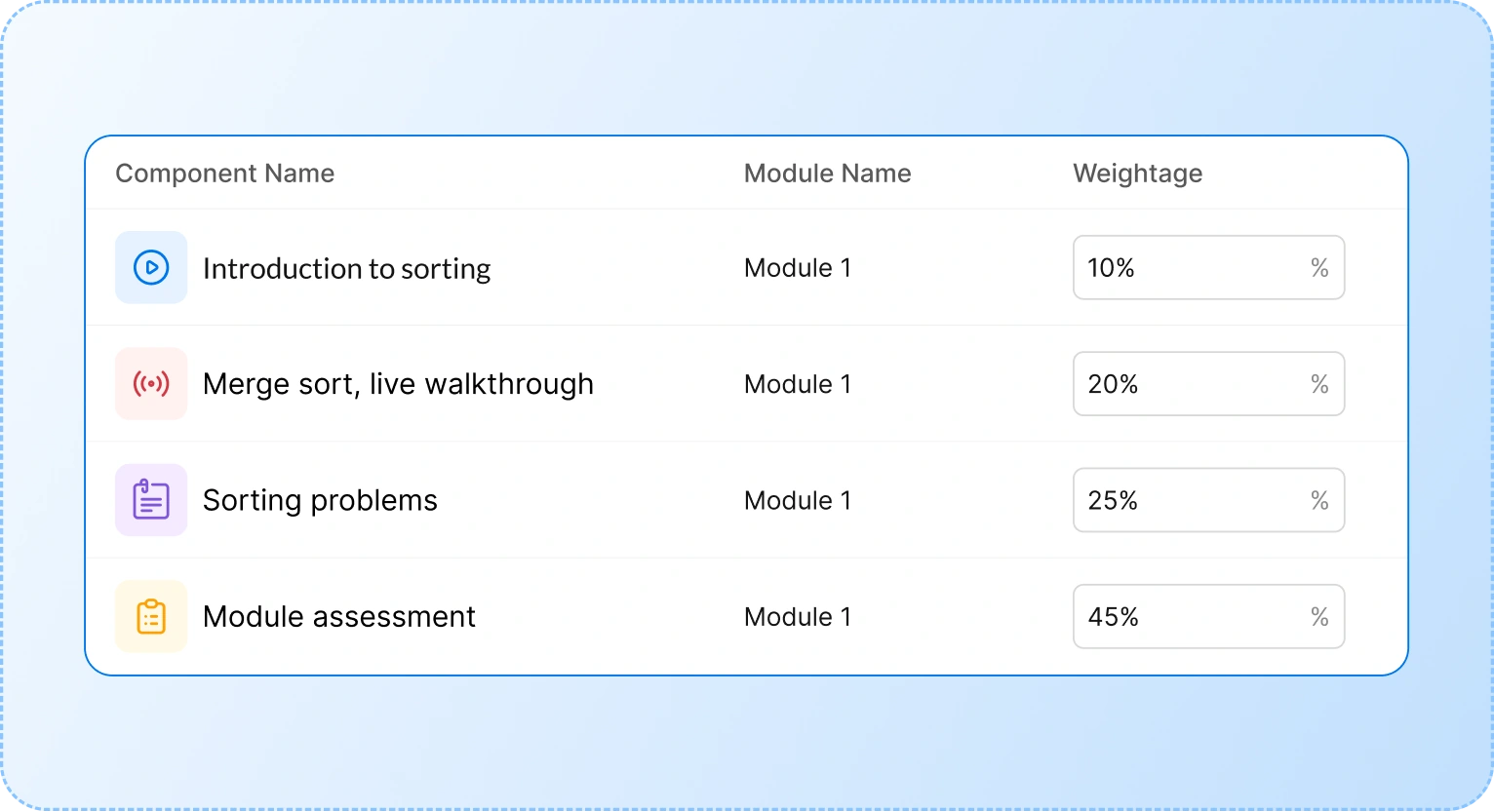
Weights you set, totals worked out for you
- Weighted componentsAssessments and sessions, at the weights you set
- Course total calculated for youOut of 100, from the weights you set
- Practice and graded results kept apartPractice never counts towards the total
- Infy Assess results post hereAt the weight you set
Reuse a whole module from the content library
- Tests and allA module moves with its tests, into any course
- Every part of the moduleVideos, readings, assignments and tests come with it
- Any course or batchAdd the same module to as many courses as you need
- Look before you addOpen a module to check it, then add it
- Your own and oursModules your faculty build sit beside the library
Live classes
Teach live on our Live Meetings app, Zoom, Teams or in the room.
Schedule and join live classes from the module, and attendance stays in the course.
Attendance comes back to the courseZoom and Teams use your institution’s account.
 Live Meetings app
 Zoom
 Microsoft Teams
Also works withFaculty paste the link; learners join from the course
 Webex
- Other meeting links
Our live-class room, in the platform.
Chat, polls, breakouts, screen sharing and a whiteboard, inside the course.
Poll38 of 58 answered
Which pointer changes first?
- new.next
71% - prev.next
29%
- Schedule in the module
- Teach in any room
- Attendance and feedback
- Live Meetings recording
- Counts in the gradebook
Infy LMS Infy Assess
Tests run inside the course, and the mark posts to the gradebook.
Infy Assess runs the test, with proctoring, AI marking and coding questions.
Infy LMSYour course1- Module 3Recursion Done
- Module 4Mid-term testInfy Assess
- Module 5Trees and graphsOpens next
Add the test to a module, like any other step.
Infy AssessThe test2- AI Proctoring
 Safe Exam Browser
- AI marking
- Coding tests
Learners take it on Infy Assess, from the course.
Infy LMS gradebookThe result3| Assignments | 30% | 24 / 30 |
|---|---|---|
| Mid-term test | 40% | 33 / 40 Posted |
| Live sessions | 30% | 27 / 30 |
| Course total | 100% | 84 / 100 |
The mark posts at the weight you set. Nothing is retyped.
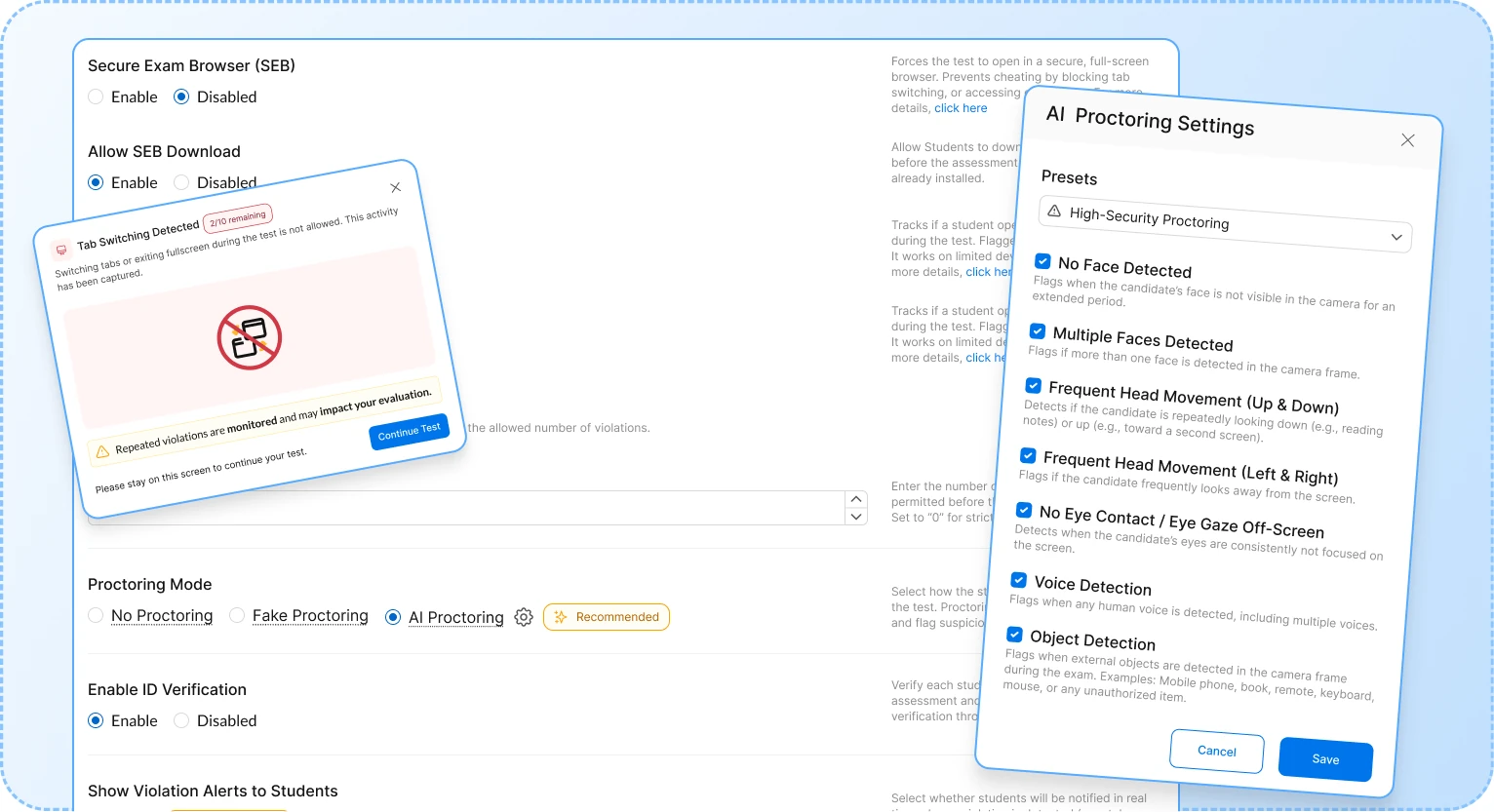
AI Proctoring, with your staff deciding.
The camera flags no face, more than one face, a head turned away and eyes off the screen during the test.
- AI flags never end or fail a test
- A tab-switch limit you set can submit the test
Locked-down lab exams.
Lab exams open only inside Safe Exam Browser, which keeps other apps and screen sharing out of the test.
- Set per test, with an access code
- Blocks screen sharing and remote desktop apps
One Integrity Score per student.
Flags roll into a 0 to 100 score, banded Excellent, Acceptable, Suspicious or Risky.
- Built from the checks you turn on
- Your staff review it and decide
Safe Exam Browser is on for this testOpens only in Safe Exam Browser on Windows and macOS lab machines.
- Screen sharingBlocked
- Second monitorBlocked
- ScreenshotsBlocked
- Virtual machinesBlocked
- Remote desktop appsBlocked
- Meeting appsBlocked
Reports
A report for every course, test and learner.
See who is on track and who is slipping, from one course to the whole institution. Filter by section or batch, and export to CSV.
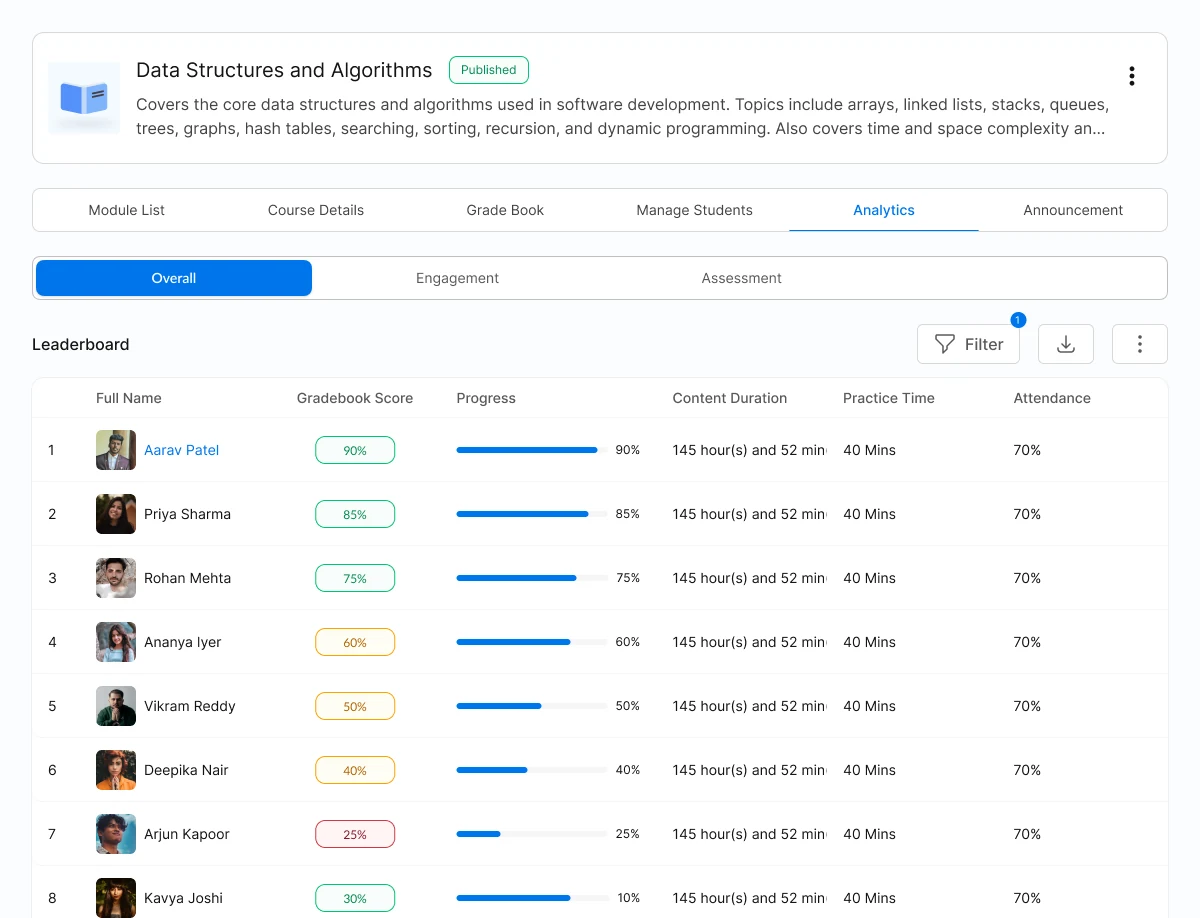
Every learner, ranked by gradebook score.
Progress, content time, practice time and attendance beside each score.
- Sort and filter by section or batch
- Export to CSV
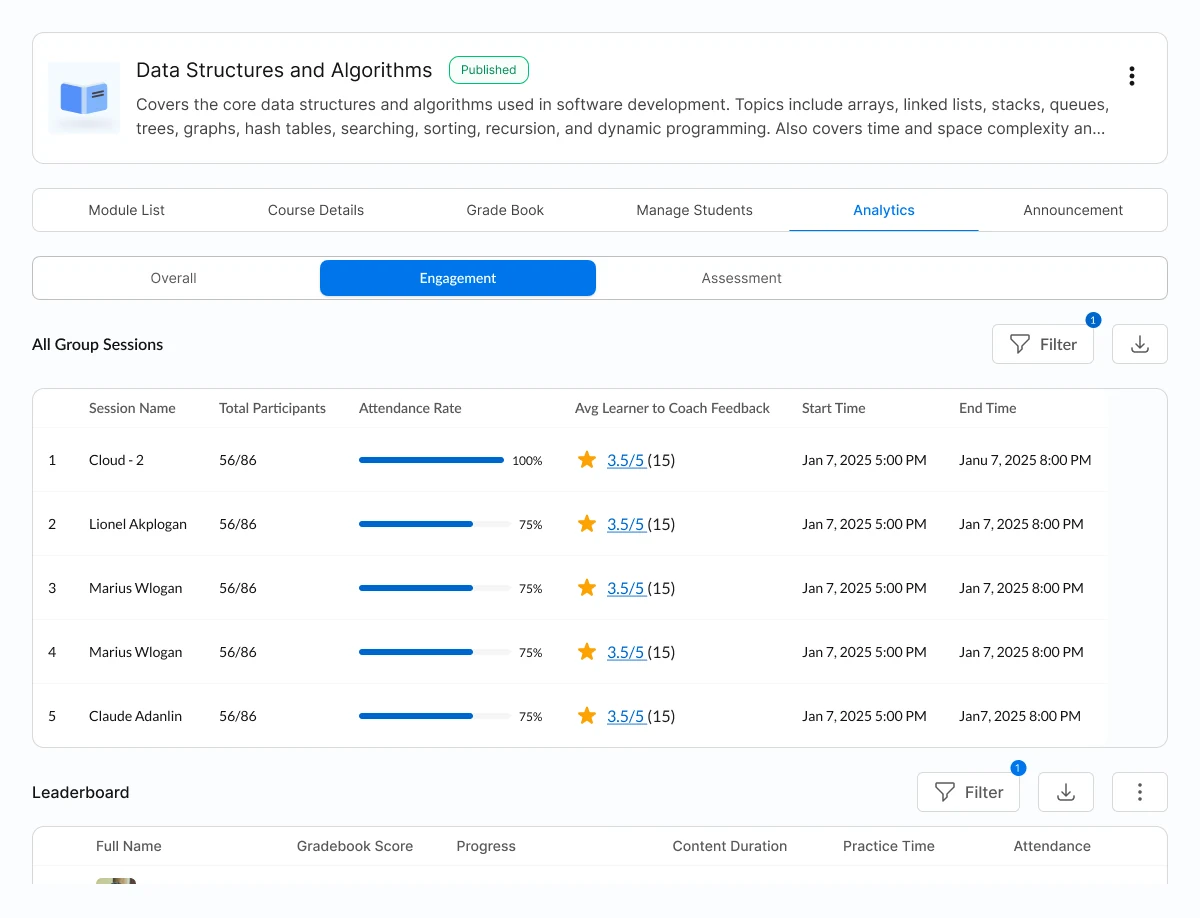
Who attended, and what they thought.
Each group session with its participants, attendance rate and the learners' feedback.
- Every session in the course
- Live Meetings app, Zoom and Teams
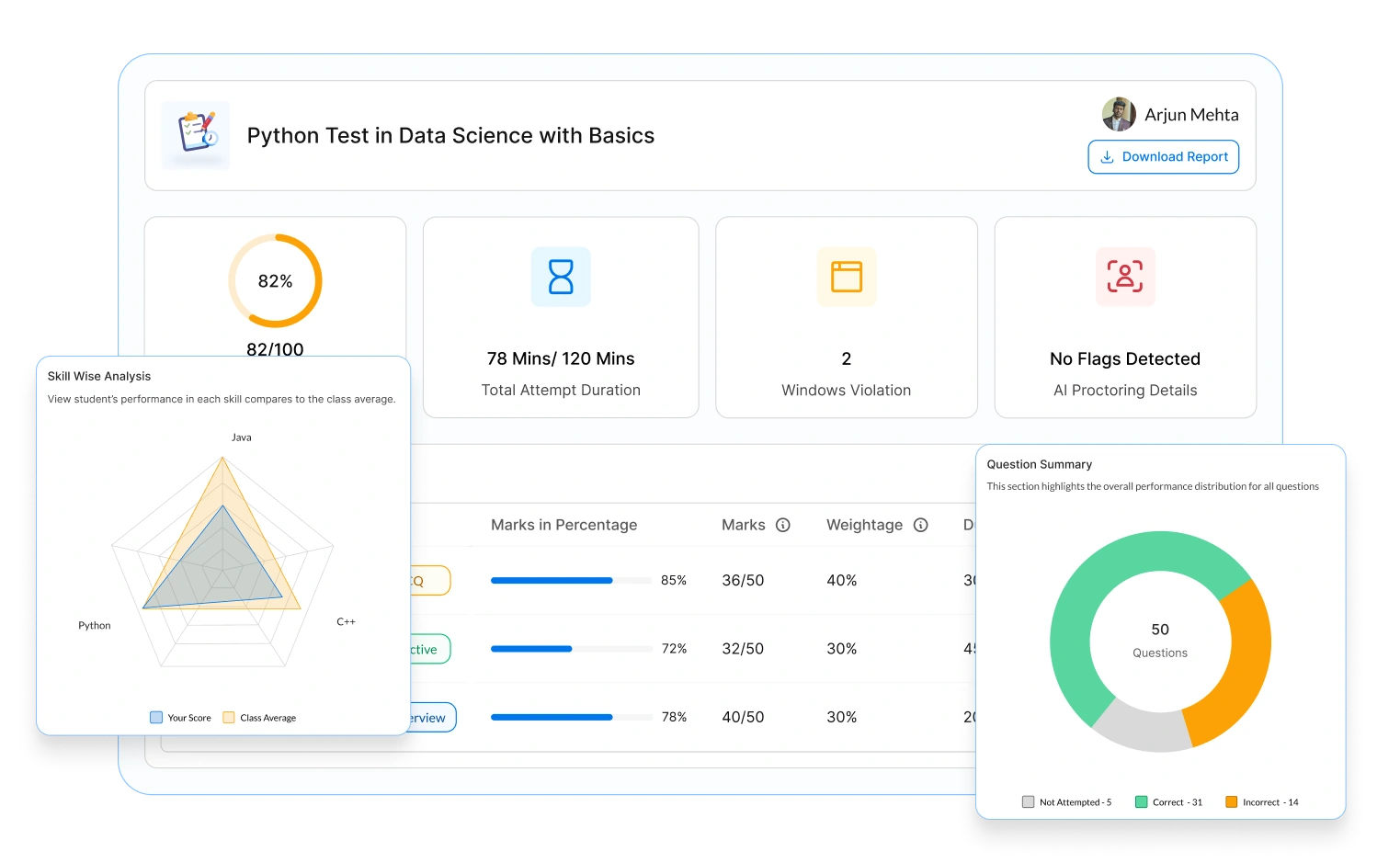
Every test, learner by learner.
Score, time, section marks and the section average for each attempt, from Infy Assess.
- Graded and practice tests reported apart
- Posts to the gradebook
Active users across the institution.
Over the period you pick.
- Daily, weekly, monthly or yearly
- Export to CSV
Active users
DailyWeeklyMonthlyYearly Export CSV
JulAugSepOct
All courses · all sections · this term
Learners see what is due next, every time they sign in.
Courses, live classes, the calendar and results sit on one dashboard.
Your dashboard, your courses.
Every course with its progress, and what is coming up.
Live classes rise to the top. Pinned above the module, ready to join 8 minutes early.
Live nowProblem Solving, Section AJoin
- Sorting basicsDone
- Quiz: ArraysUpcoming
- Assignment: Linked listsOpen
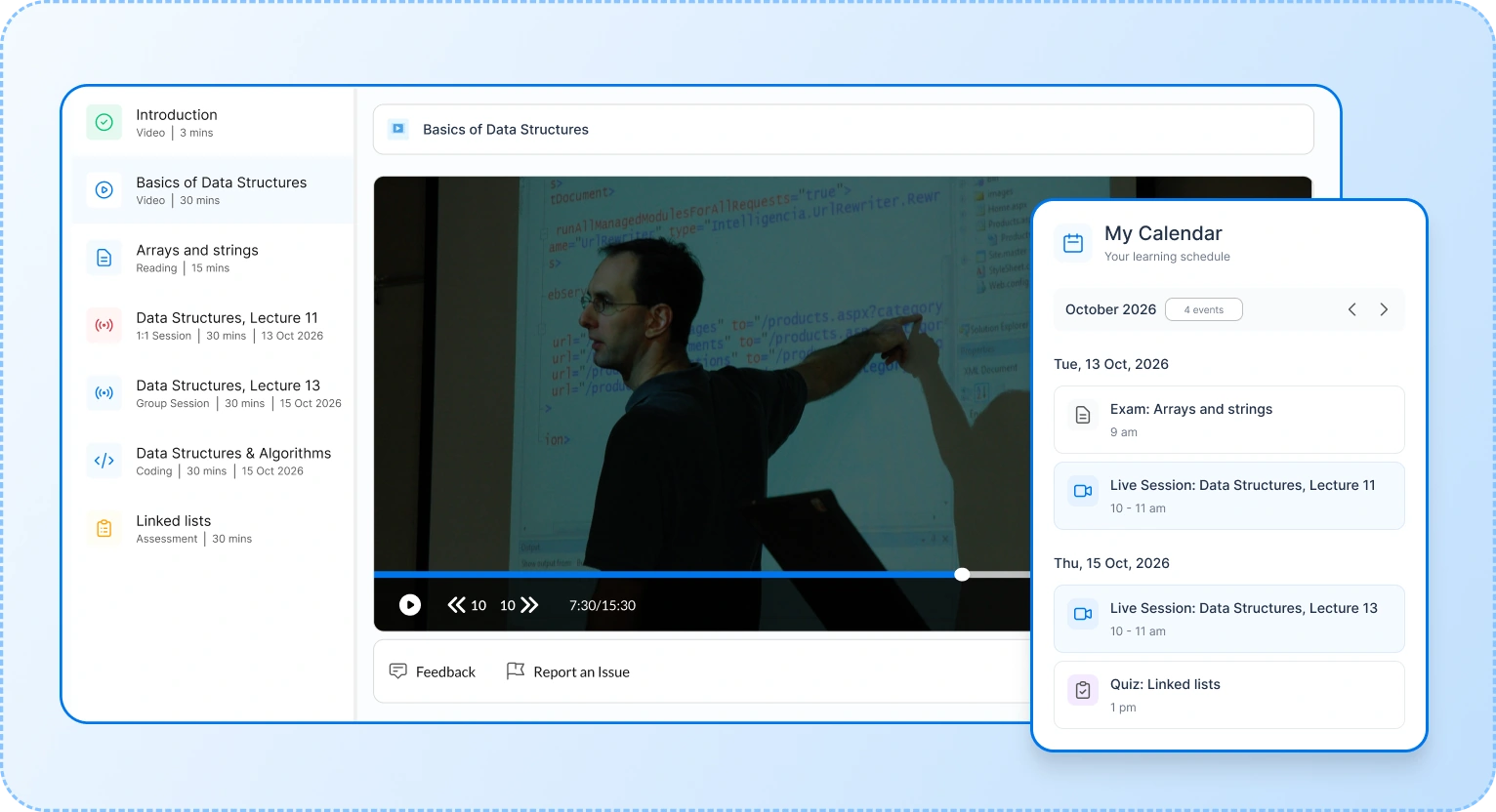
Pick up where you left off.
One click back to the last video or live class.
Data Structures
38% complete
Resume learningModule 3: TreesBinary search trees
Resume
Videos, live classes, tests and projects in one course.
- Video
- Reading
- Live class
- 1:1 and breakout
- Quizzes and exams
- Coding
- Projects
- Surveys
Every quiz and test, with its status.
Arrays quizUpcoming
Trees testOngoing
Sorting testAttempted
Recursion quizPass
Hashing quizFail
Stacks practiceExpired
Runs in the phone's browserAI captions for course videos, when switched onCoding works best on a laptop
Does Infy LMS replace our ERP?
Your ERP keeps admissions, fees and the official record. Infy LMS runs teaching and learning, and records move by bulk upload and CSV.
Your systemsYour ERP and student administration
- Student records
- Faculty records
- Admissions and enrolment
- Fees
- Examinations
- Statutory attendance
What crosses
Sign-in
Set up by our team
Learners and faculty
By bulk upload
Course records
By CSV export
Infy LMSInfy LMS: teaching and learning
- Courses, live classes and attendance
- Tests and the gradebook
- Reports and analytics
The suite
How Infy LMS works with the rest of InfyLearn.
Infy LMS runs on the InfyLearn platform. Add Infy Assess, Infy Interview, Infy Resume or Infy Recruit when you need them.
FAQ
Questions institutions ask about Infy LMS.
What is Infy LMS?
Infy LMS is a learning management system for colleges and universities, from InfyLearn, a Board Infinity company. It runs degree programmes term by term, with live classes, QR attendance, Infy Assess tests and a weighted gradebook, set up for you by our team.
How is Infy LMS different from Moodle or Canvas?
Infy LMS is built around the degree programme. Campuses, programmes, terms, sections and specialisation tracks are set up for you, live classes and attendance sit inside the course, and Infy Assess results post to a weighted gradebook. You can start with one programme or batch and keep your current LMS for the rest.
Can Infy LMS run a full degree programme term by term?
Yes. In Infy LMS, each programme is set up with its campuses and sections, and gets terms with their own dates. Each term holds core courses and specialisation tracks with their weights, and semester, trimester and annual systems are supported. Learners follow the programme term by term in their Learning Journey, and each admin sees only their part.
Can course marks in Infy LMS follow our weightage?
Yes. In the Infy LMS course gradebook you give each assessment and session that counts a weight, and the weights total 100%. Infy Assess results and attendance post to it at the weight you set, and each learner's gradebook score shows in the course reports.
How does Infy LMS work with Infy Assess?
Infy Assess, InfyLearn's assessment platform, runs inside Infy LMS courses. Faculty set MCQ, written and coding tests, practice or graded, with question banks, attempt limits and time limits. Proctored tests run on a laptop or desktop. Results post to the course gradebook at the weight you set. Infy Assess also works on its own.
Does Infy LMS support live classes, and which video tools can we use?
Yes. A live class is a step inside the course. In our Live Meetings app, with polls, breakouts and a whiteboard, recordings and attendance return to the course. Zoom and Microsoft Teams meetings are created from Infy LMS on your institution's own account, and attendance comes back. For Webex, faculty add the meeting link.
Does Infy LMS work for classroom teaching, not just online?
Yes. In Infy LMS, schedule the in-room class in the course and project its QR code, which refreshes every 15 seconds. Learners scan it on their phones to mark themselves present. Faculty can mark anyone by hand and add a note, such as medical leave. Attendance can then carry a weight in the course gradebook.
Who sets Infy LMS up, and how much work is it for faculty?
Our team does most of the Infy LMS set-up. We set up your campuses, programmes, terms and sections, load learners and faculty by bulk upload, set up sign-in and can build the first courses with you. Faculty then build each course once, from modules they can reuse in other courses, and set the gradebook weights for it.
Does Infy LMS connect to our ERP?
Infy LMS works alongside your ERP rather than replacing it. Your ERP keeps admissions, fees and the official record. Learners and faculty come into Infy LMS by bulk upload, and course records go out as CSV. Our team sets up sign-in for your institution.
Who owns our data in Infy LMS, and can we take it with us?
Your institution does. Course records, attendance and marks in Infy LMS belong to the institution, not to us, and course records export as CSV whenever you need them, including before you leave. Your data is hosted in the Mumbai region. For retention terms and a data processing agreement, ask us on the demo call.
How is Infy LMS priced?
Infy LMS is priced per institution, by scale: mainly the number of learners, plus the parts of the suite you use, such as live sessions and Infy Assess tests. There is no public price list. Tell us your numbers and the programmes you want to run on a demo call, and we will send you a figure.
Can learners use Infy LMS on a phone?
Yes. Infy LMS runs in the browser on phones, tablets and laptops. Courses, videos, quizzes, live classes and QR attendance work on a phone. Proctored tests need a laptop or desktop with a camera, and coding tests need a laptop or desktop.
Can companies use Infy LMS for employee training?
Yes. Corporate L&D teams run cohort programmes on Infy LMS: live sessions on Live Meetings or their own Zoom or Teams, self-paced work between sessions, 1:1 coaching with up to five coaches, email reminders before each session and a certificate on completion. AI feedback after 1:1 sessions can be switched on.
See Infy LMS on a programme like yours.
Tell us one programme, training batch or cohort, and we walk through the demo on your own structure.